> For the complete documentation index, see [llms.txt](https://guides-mechboards.gitbook.io/guides/llms.txt). Markdown versions of documentation pages are available by appending `.md` to page URLs; this page is available as [Markdown](https://guides-mechboards.gitbook.io/guides/mbuk-build-guides/list-of-other-build-guides/the-pockettype-build-guide.md).
# The PocketType Build Guide
## Flash your controller
{% file src="/files/GVzmwQtpyokVKe79AOWS" %}
1. Connect the keyboard to your device using a USB cable.
2. Hold the BOOT button when plugging in the controller OR double tap the RESET button QUICKLY. (It might take a couple of attempts)
3. A file explorer window will pop up, copy the file from above into the directory. The windows should automatically close.
4. Once the window automatically closes, you can continue with the build.
## Build Guide
1. Bend, fit and solder all the diodes- stripe should be towards the square pad
2. Bend, fit and solder the two resistors. Orientation doesn’t matter.
3. Fit all 48 switches. They’ll only go in one way. Solder them!
4. Fit the two LEDs. The long leg is the positive and goes into the round hole.
5. Fit and solder the header strips for the controller. Put the short side through the Pockettype PCB, leaving the long side pointing up. Solder just one pin until you are sure they are nice and straight and parallel to each other.
6. Fit the controller onto the header strips. See above picture for correct orientation. Solder.
7. Plug in and test. Fit key caps.
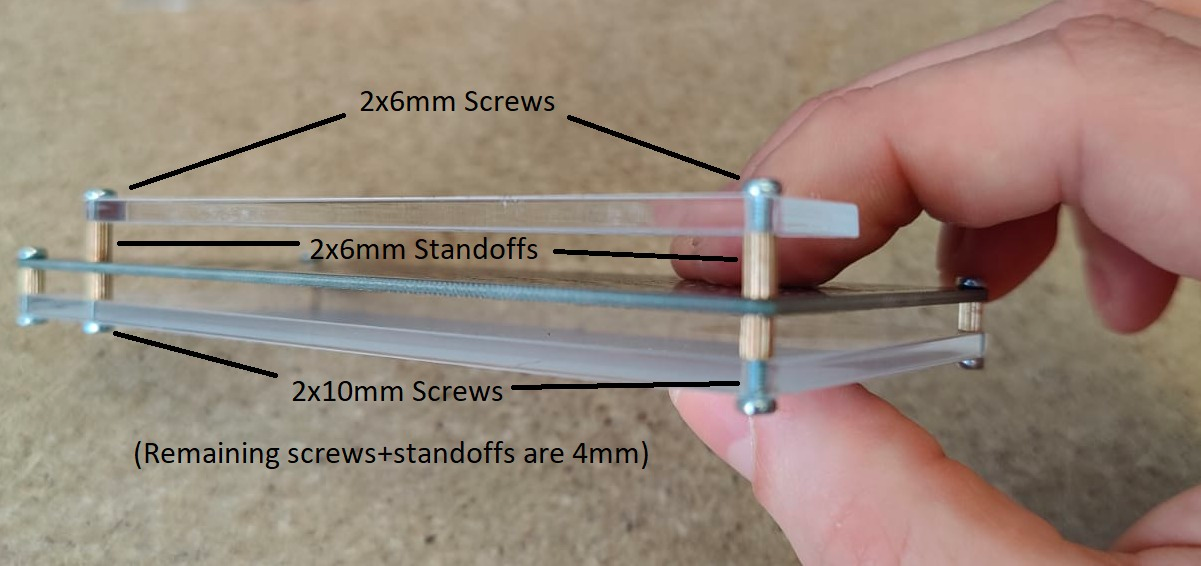
8. Case assembly- see graphic below
## Using your PocketType
The firmware supports vial to allow for key rebinding, please see our [Using VIAL guide](/guides/other-guides/using-vial.md).
 ## Flash your controller
{% file src="/files/GVzmwQtpyokVKe79AOWS" %}
1. Connect the keyboard to your device using a USB cable.
2. Hold the BOOT button when plugging in the controller OR double tap the RESET button QUICKLY. (It might take a couple of attempts)
3. A file explorer window will pop up, copy the file from above into the directory. The windows should automatically close.
4. Once the window automatically closes, you can continue with the build.
## Flash your controller
{% file src="/files/GVzmwQtpyokVKe79AOWS" %}
1. Connect the keyboard to your device using a USB cable.
2. Hold the BOOT button when plugging in the controller OR double tap the RESET button QUICKLY. (It might take a couple of attempts)
3. A file explorer window will pop up, copy the file from above into the directory. The windows should automatically close.
4. Once the window automatically closes, you can continue with the build.