> For the complete documentation index, see [llms.txt](https://guides-mechboards.gitbook.io/guides/llms.txt). Markdown versions of documentation pages are available by appending `.md` to page URLs; this page is available as [Markdown](https://guides-mechboards.gitbook.io/guides/getting-started/wired-solder-kits.md).

# Wired Solder Kits

{% hint style="danger" %}
This page is for **Wired Kits** with an RP2040 controller. If you're looking for the **Wireless Pre-Builds** getting started guide, head [**here**](/guides/getting-started/wireless-solder-kits.md)
{% endhint %}

## Things to check

* Check over your keyboard to make sure it is what you ordered and has no visible damage. If you have any issues, please [just reach out to us!](https://www.mechboards.co.uk/support)
* Check there are no loose screws. Sometimes screws come loose in shipping.

{% hint style="danger" %} <mark style="color:red;">**Make sure to plug in your TRRS cable FULLY before plugging in a USB cable.**</mark>
{% endhint %}

<figure><img src="https://456586235-files.gitbook.io/~/files/v0/b/gitbook-x-prod.appspot.com/o/spaces%2F6bjiReLol1HqmhjbjtT5%2Fuploads%2Fg756Cibc0NHfxlKPMxfQ%2Fimage.png?alt=media&amp;token=26557449-3f7e-484a-b7b2-5388f88814c3" alt=""><figcaption><p>Left: an incorrectly inserted TRRS cable. Right: a correctly inserted TRRS cable</p></figcaption></figure>

## Things to know

* Your keyboard is flashed and ready to go! You can use it straight away.&#x20;
* If you are using a Chrome or Edge based browser, use the [usevia.app](https://usevia.app/#/) website  &#x20;to change your keymap layout. You can also try the [standalone app](https://github.com/the-via/releases/releases).&#x20;

{% hint style="warning" %}
**Not sure how to change your keymap file using VIA? Check out our** [**guide**](/guides/other-guides/using-via.md)
{% endhint %}

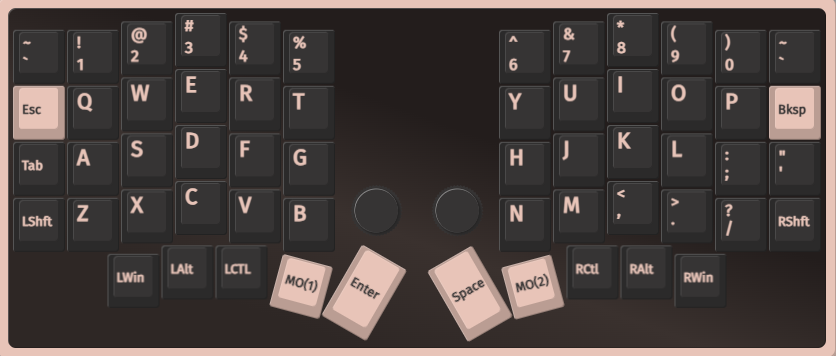
* The keymap that is pre-flashed is shown below

{% tabs %}
{% tab title="Corne" %}
Layer 0 - Main Layer

<figure><img src="https://456586235-files.gitbook.io/~/files/v0/b/gitbook-x-prod.appspot.com/o/spaces%2F6bjiReLol1HqmhjbjtT5%2Fuploads%2F0Eet6l5ghtbVa8b1KCaq%2Fimage.png?alt=media&amp;token=54b0f403-7f8c-494b-b708-2523aa5652c4" alt=""><figcaption></figcaption></figure>

Layer 1 (Accessible by pressing the Fn1(3) button)

<figure><img src="https://456586235-files.gitbook.io/~/files/v0/b/gitbook-x-prod.appspot.com/o/spaces%2F6bjiReLol1HqmhjbjtT5%2Fuploads%2FSqdqIinUXc4QrGKo2rWb%2Fimage.png?alt=media&amp;token=b6902b09-139f-4603-9d25-5770a1e7d602" alt=""><figcaption></figcaption></figure>

Layer 2 (Accessible by pressing the Fn2(3) button)

<figure><img src="https://456586235-files.gitbook.io/~/files/v0/b/gitbook-x-prod.appspot.com/o/spaces%2F6bjiReLol1HqmhjbjtT5%2Fuploads%2F6MLpZjT3wCNjNt6uZYTr%2Fimage.png?alt=media&amp;token=fe38124a-d327-4ccc-bbff-2df1ff015d8d" alt=""><figcaption></figcaption></figure>

Layer 3 (Accessible by pressing the both Fn1(3) and Fn2(3) button)

<figure><img src="https://456586235-files.gitbook.io/~/files/v0/b/gitbook-x-prod.appspot.com/o/spaces%2F6bjiReLol1HqmhjbjtT5%2Fuploads%2FjrzpIDqqXD0Ic0HMkf6V%2Fimage.png?alt=media&amp;token=84684ea0-886b-40b5-a4b7-5075cf1038b1" alt=""><figcaption></figcaption></figure>
{% endtab %}

{% tab title="Lily58" %}
Layer 0 - Main Layer

<figure><img src="https://456586235-files.gitbook.io/~/files/v0/b/gitbook-x-prod.appspot.com/o/spaces%2F6bjiReLol1HqmhjbjtT5%2Fuploads%2F2D5lplNUZPKLld3hrvg4%2Fimage.png?alt=media&amp;token=abb074a1-33d8-4fb4-be9f-c55934735f00" alt=""><figcaption></figcaption></figure>

Layer 1 (Accessible by holding the MO(1) button)

<figure><img src="https://456586235-files.gitbook.io/~/files/v0/b/gitbook-x-prod.appspot.com/o/spaces%2F6bjiReLol1HqmhjbjtT5%2Fuploads%2FyeeC6wqIk4H448K742AB%2Fimage.png?alt=media&amp;token=10f06bbe-6342-48cc-b7d7-e2b5938cb146" alt=""><figcaption></figcaption></figure>

Layer 2 (Accessible by holding the MO(2) button)

<figure><img src="https://456586235-files.gitbook.io/~/files/v0/b/gitbook-x-prod.appspot.com/o/spaces%2F6bjiReLol1HqmhjbjtT5%2Fuploads%2FWsIMc0pxQ2VccQnzEFPN%2Fimage.png?alt=media&amp;token=1f2e3e7c-87d5-4d1d-81ed-bc3ba3267016" alt=""><figcaption></figcaption></figure>

Layer 3  (Accessible by holding both the MO(1) and MO(3) button)

<figure><img src="https://456586235-files.gitbook.io/~/files/v0/b/gitbook-x-prod.appspot.com/o/spaces%2F6bjiReLol1HqmhjbjtT5%2Fuploads%2FDzX5mrJKb62kNCJ8iFhQ%2Fimage.png?alt=media&amp;token=8f5917cf-f000-4ebe-bd6a-cf0f309c8949" alt=""><figcaption><p>These are keycodes for RGB - this picture will be updated soon with correct keymapping</p></figcaption></figure>
{% endtab %}

{% tab title="Sofle V2" %}
Layer 0 - Main Layer

<figure><img src="https://456586235-files.gitbook.io/~/files/v0/b/gitbook-x-prod.appspot.com/o/spaces%2F6bjiReLol1HqmhjbjtT5%2Fuploads%2Fo0bhbjeCWhg4TdIBvPj0%2Fimage.png?alt=media&amp;token=77b84c8f-229c-4fdb-8d9f-7a4c3f40d75a" alt=""><figcaption></figcaption></figure>

Layer 1 (Accessible by holding the MO(1) button)

<figure><img src="https://456586235-files.gitbook.io/~/files/v0/b/gitbook-x-prod.appspot.com/o/spaces%2F6bjiReLol1HqmhjbjtT5%2Fuploads%2FRAQJJmTddE3cmPgidxYF%2Fimage.png?alt=media&amp;token=aca315cc-cd7d-4184-8571-ae91e6161a6f" alt=""><figcaption></figcaption></figure>

Layer 2 (Accessible by holding the MO(2) button)

<figure><img src="https://456586235-files.gitbook.io/~/files/v0/b/gitbook-x-prod.appspot.com/o/spaces%2F6bjiReLol1HqmhjbjtT5%2Fuploads%2Fa9T3cpT4cQn8WMDSopXz%2Fimage.png?alt=media&amp;token=66b151a8-d5c4-4c98-9f6a-f28965026c37" alt=""><figcaption></figcaption></figure>

Layer 3 (Accessible by holding both the MO(1) and MO(2) button)

<figure><img src="https://456586235-files.gitbook.io/~/files/v0/b/gitbook-x-prod.appspot.com/o/spaces%2F6bjiReLol1HqmhjbjtT5%2Fuploads%2FLTDe6ULSYL7dpS1pZ204%2Fimage.png?alt=media&amp;token=1a16e7ae-b6a7-4bbd-b69b-5d7504813496" alt=""><figcaption><p>These are keycodes for RGB - this picture will be updated soon with correct keymapping</p></figcaption></figure>
{% endtab %}

{% tab title="Ferris Sweep" %}
Layer 0 - Main Layer

<figure><img src="https://456586235-files.gitbook.io/~/files/v0/b/gitbook-x-prod.appspot.com/o/spaces%2F6bjiReLol1HqmhjbjtT5%2Fuploads%2FCuetdZ36uO2uUE7Ex4iZ%2Fimage.png?alt=media&amp;token=3365fefd-7776-43ef-a5e6-c8d12820c675" alt=""><figcaption></figcaption></figure>

Layer 1 (Accessible by holding the LT(1,KC) button)

<figure><img src="https://456586235-files.gitbook.io/~/files/v0/b/gitbook-x-prod.appspot.com/o/spaces%2F6bjiReLol1HqmhjbjtT5%2Fuploads%2FmHsagTCVm7lWQXsz76rl%2Fimage.png?alt=media&amp;token=3f4e208f-82dd-4fe3-adfe-dff4eacb7650" alt=""><figcaption></figcaption></figure>

Layer 2

<figure><img src="https://456586235-files.gitbook.io/~/files/v0/b/gitbook-x-prod.appspot.com/o/spaces%2F6bjiReLol1HqmhjbjtT5%2Fuploads%2FhFKzeW4S4fR4yFuNlds3%2Fimage.png?alt=media&amp;token=b0617d22-2422-4ca5-a1b1-5a616d04f350" alt=""><figcaption></figcaption></figure>

Layer 3

<figure><img src="https://456586235-files.gitbook.io/~/files/v0/b/gitbook-x-prod.appspot.com/o/spaces%2F6bjiReLol1HqmhjbjtT5%2Fuploads%2FtKso1ax0eTNNCVJC0cwh%2Fimage.png?alt=media&amp;token=66a5c752-33ef-4bab-a83e-f4343faa6499" alt=""><figcaption></figcaption></figure>
{% endtab %}
{% endtabs %}